Case 3: When Gamification Works Too Well
Redesigning Spatial Vis to balance persistence, using help when needed, additional practice, and mastery.
My Role: Sole UX Researcher and UI Designer
Responsibilities: Behavioral Analysis · Product Strategy · Interaction Design · UI Design · Grading System Design · Testing
Goal: Preserve the benefits of persistence while encouraging students to use help when needed and rewarding mastery over completion.
The Challenge
Students cared about their stars more than we expected.
The star system I designed successfully encouraged students to persist before asking for help. But as we observed students using Spatial Vis over time, we discovered an unintended consequence.
Some students were submitting an assignment 20 or more times rather than sacrifice a star by using a Hint.
Persistence was exactly the behavior we wanted to encourage, but students were sometimes taking it too far. Hints and Peeks existed because there are times when students genuinely need support. I didn't want the grading system to make asking for help feel like a permanent penalty.
At the same time, I wanted to preserve an important distinction: a Hint provides guidance while still requiring the student to solve the problem, whereas a Peek reveals substantially more of the solution.
How could I preserve productive persistence while making it okay for students to use help when they needed it?
Designing the Bonus Star System
Use help when you need it. Then show what you've learned.
I designed a bonus star system that allowed students to recover stars lost on required assignments by successfully completing additional assignments within the same lesson.
The amount of additional practice corresponded with the amount of help the student had used.
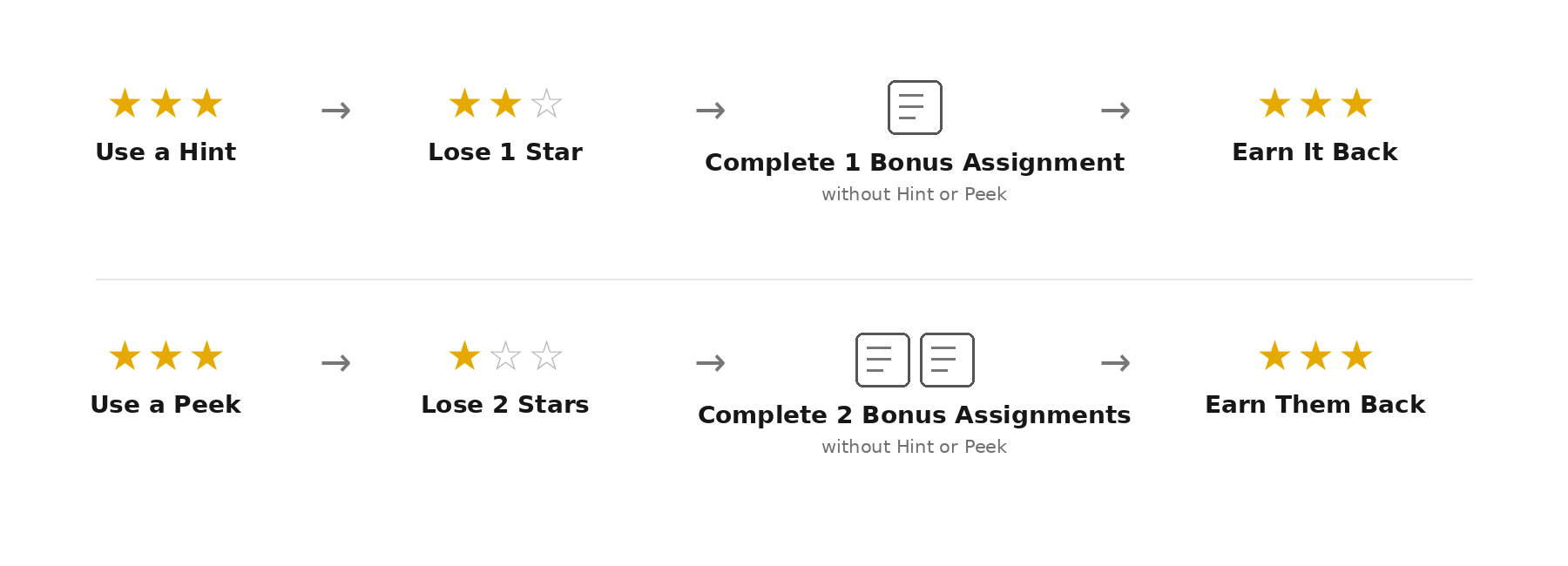
Bonus stars could only be earned when an additional assignment was completed without using a Hint or Peek. This ensured that earning a star back represented successful independent problem solving rather than simply completing more work.
The system also continued to encourage students to use a Hint before a Peek. A student who needed a small amount of guidance could recover the lost star with one additional problem, while a student who viewed the solution needed to complete two problems independently.
A perfect score no longer meant “I never needed help.” It meant “I ultimately demonstrated that I could do the work independently.”
The Dashboard Was Reinforcing the Wrong Goal
Completing the work and mastering the work are not the same thing.
The new grading system also made me reconsider how we communicated student progress.
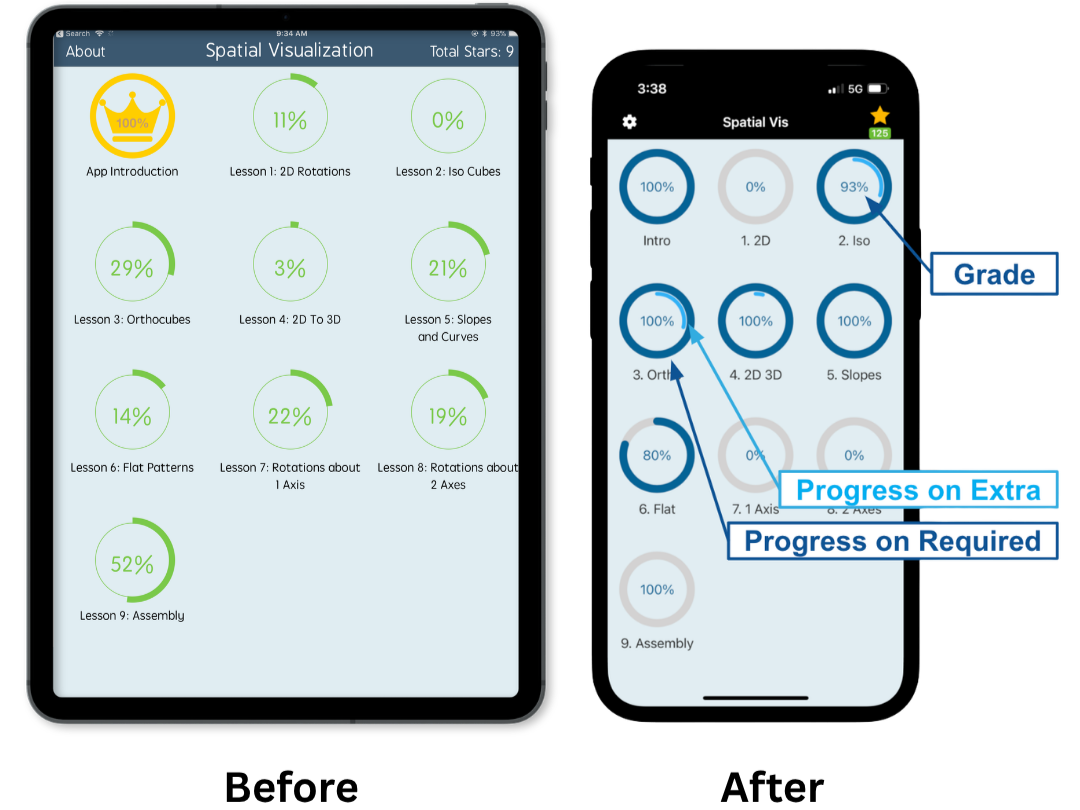
Our original module interface was built around completion. An outer circle and center percentage showed how many of the available assignments a student had finished.
As we observed how students and instructors interpreted the interface, I identified two problems.
Completion didn't communicate performance. A student who solved assignments independently and a student who relied heavily on Peeks could both show the same progress. Some instructors also used the progress percentage as a grade, giving students little incentive to perform well rather than simply finish the assignments.
The interface assumed every assignment was required. In practice, instructors often assigned only a portion of the available problems. A student could complete everything their instructor required and still see something like 67%. Some students interpreted this as unfinished work and continued completing optional assignments simply to make the progress indicator reach 100%.
The interface was accurately showing completion, but it wasn't showing what students and instructors actually needed to know.
I needed to separate required work, additional practice, and performance.
Redesigning the Module Dashboard
One visualization. Three different questions.
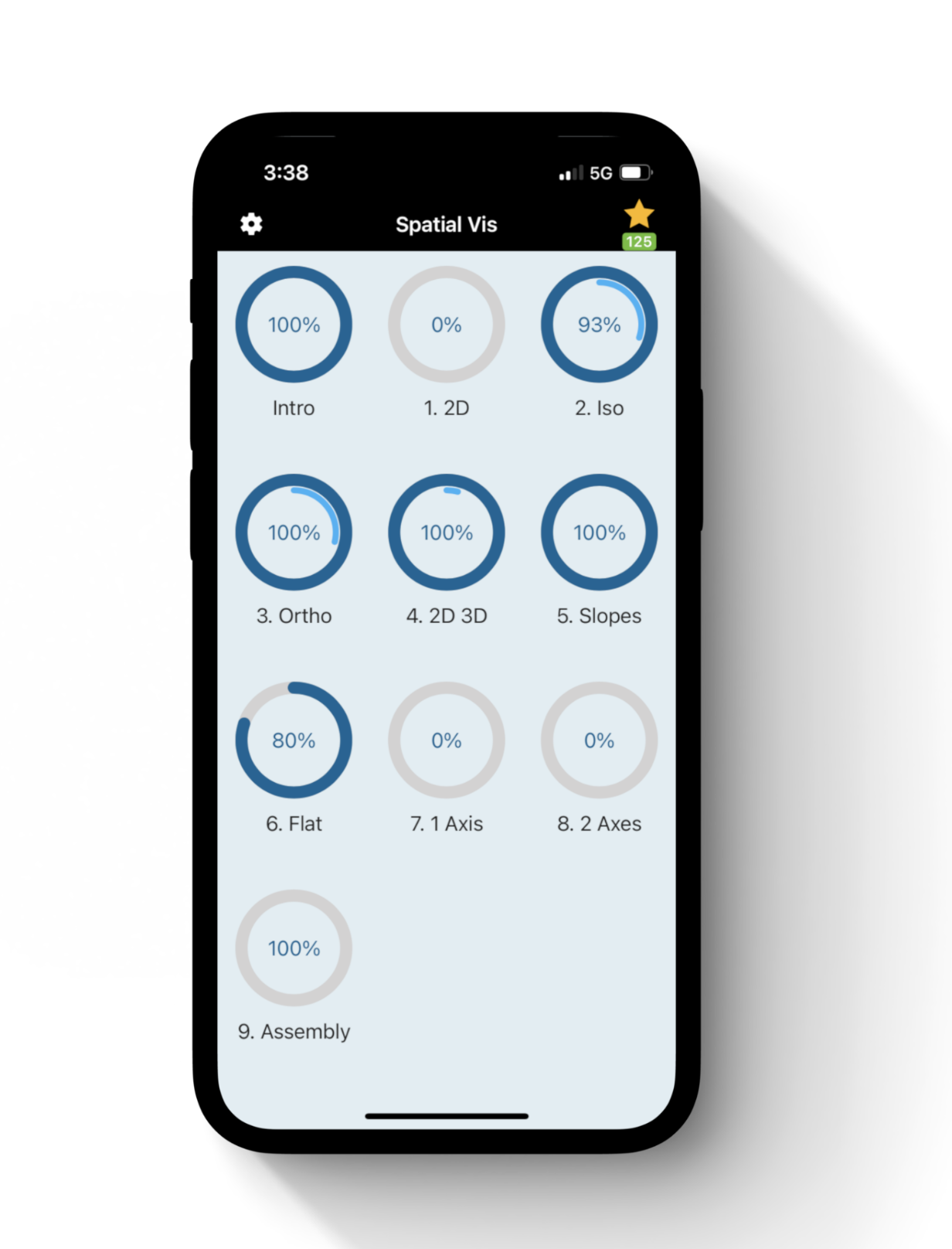
I redesigned the module progress indicator so that each component communicated something different.
Outer Circle — Required Progress
Have I completed the assignments my instructor requires?
Inner Circle — Additional Progress
How much additional practice have I completed?
Center Percentage — Grade
How well have I performed?
This allowed progress and performance to coexist without confusing the two.
Making the Next Step Clear
Consider a student who has completed all required assignments but used a Hint on several problems.
Under the redesigned interface, that student might see:
Full outer circle
All required work is complete.
93% grade
Their grade reflects stars lost from using help.
Incomplete inner circle
Additional assignments are still available.
At a glance, the student can understand:
My required work is finished. I have a 93%. If I want to improve my grade, I can complete additional assignments.
Previously, that same student might simply have seen an incomplete progress percentage, without knowing whether it represented unfinished required work, optional assignments, or how well they had performed.
For instructors, separating grade from progress also made it easier to see how well students were doing, not simply whether they had finished.
Redesigning the Incentive, Not Removing It
The goal wasn't to make stars less meaningful. Their value was exactly why the original system had been effective at encouraging persistence.
Instead, I redesigned what the stars encouraged students to do.
Before
Persist → Avoid Help → Preserve Stars
Using help could feel like permanently giving something up.
After
Persist → Use Help When Needed → Practice Independently → Recover Stars
Students were still encouraged to try independently and to use a Hint before a Peek. But needing help no longer prevented them from ultimately earning a perfect grade.
At the same time, the redesigned dashboard shifted the emphasis from completing everything to understanding both what was required and how well the student was performing.
The goal shifted from avoiding help to demonstrating mastery after receiving help.
The Outcome
A grading system designed around mastery rather than completion.
The redesigned system addressed two unintended behaviors we had observed after launching the original gamification experience.
Students could now use help when they needed it without permanently sacrificing their grade. Earning those stars back, however, required additional independent practice. The Hint and Peek system continued to encourage students to use the least amount of help they needed.
The redesigned module interface also separated required progress, additional practice, and grade, giving students a clearer understanding of what they needed to complete and how well they were performing.
Together, these changes better aligned the product with the learning behaviors we wanted to encourage: persistence, using help when needed, additional practice, and ultimately solving problems independently.
What I Learned
Successful designs still need to be observed after launch.
The original gamification system did what I had designed it to do: students became more persistent. What I hadn't anticipated was how strongly some students would respond to the stars.
Likewise, our original progress indicator accurately measured completion, but watching students and instructors use it revealed that the metric itself was influencing behavior. Students tried to reach 100% even when they had completed all required work, and some instructors treated completion as a measure of performance.
This project reinforced the importance of evaluating a design beyond whether it achieved its original goal. A successful incentive can still create unintended behaviors.
Rather than removing the incentives that were working, I redesigned the system around a more balanced definition of success: try independently, use help when you need it, practice what you've learned, and ultimately demonstrate that you can solve the problem on your own.